Two documents.
A split view.
Compare two PDFs side by side. Each document maintains its zoom to read details without losing your place.
- 1 to 4 columns
- 11 transitions, or none
- Zoom under cursor

YOUR DOCUMENTS. WITHOUT LIMITS.
Read, organize, merge and annotate your PDFs.
Forms, OCR and measurements in one
Windows app. Your files stay on your PC.
Free Reader · Windows 10 & 11 · Microsoft Store
local, on
your computer
Pro per month
cancellable at any time
The reader?
Free, no account.
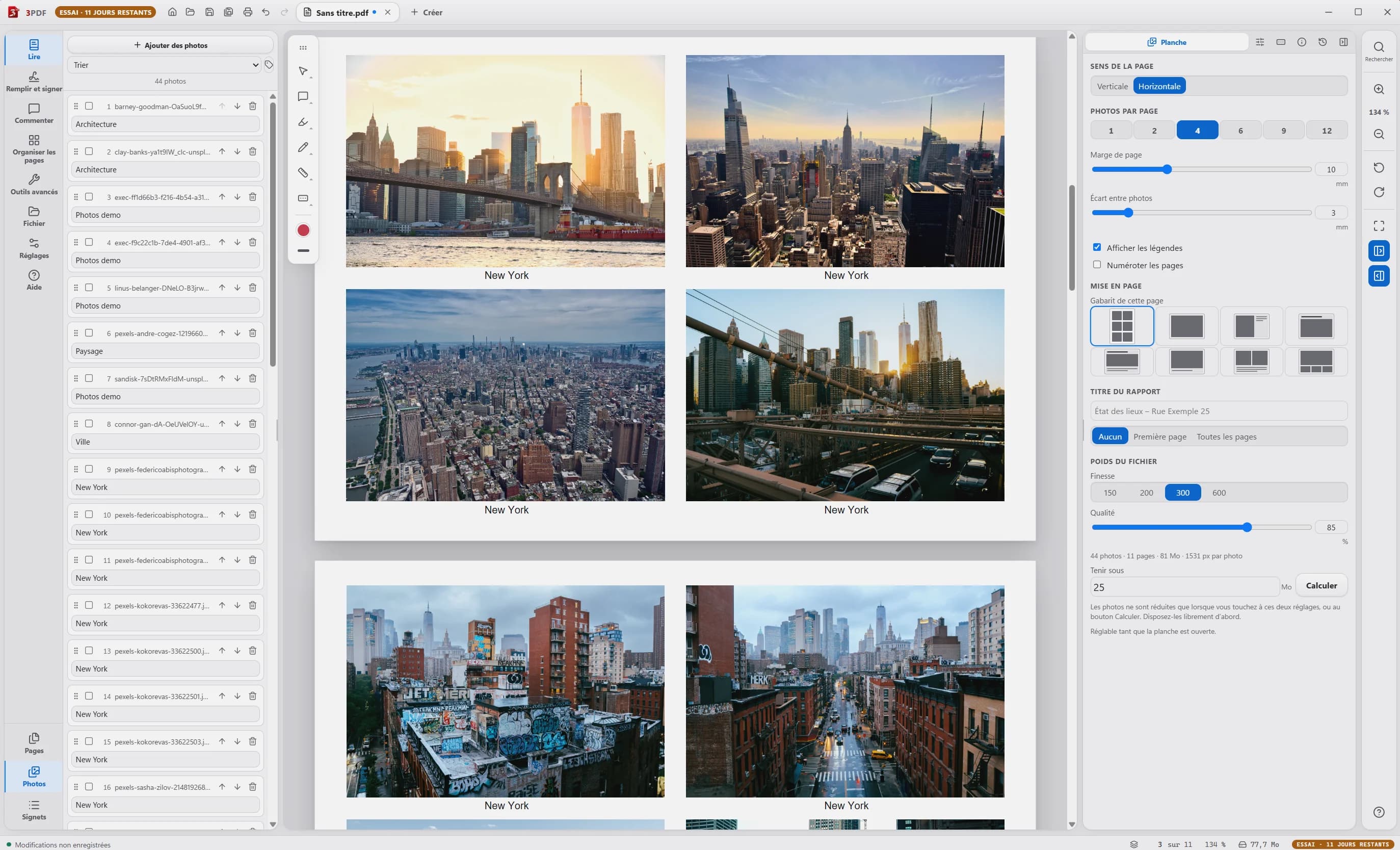
The actual 3PDF interface.
Your documents, on your PC.
EVERYTHING YOU NEED
EXTRACT PAGES · SIMPLE DRAG AND DROP
One page or an entire selection: drag thumbnails from 3PDF to a folder in Windows Explorer. A new PDF is created there, with only the chosen pages.
On the left of the document, click on the thumbnail of the page to extract or select multiple pages.
Open the folder next to 3PDF. Keep clicking on the thumbnail and drag it to this folder.
The chosen pages are gathered in a file, directly in this folder.
Extraction available with 3PDF Pro.
Open 3PDF in the Microsoft StoreUpload multiple files. Reorganize their pages. Export a single PDF.
Drag a document between two pages, at the precise location of your choice.
Your pages remain visible. A double-click folds or unfolds each document.
SMALL DETAILS CHANGE EVERYTHING
Compare two PDFs side by side. Each document maintains its zoom to read details without losing your place.
Find your signatures in the “Fill in and sign” panel. Import your image, then place it on the document.
TO GO TO THE END OF THE DOCUMENT
Create and fill real AcroForm fields. They can still be used in other compatible PDF readers.
Text, multiline, validation and calculations.
OCR adds an invisible text layer. The appearance remains intact; content becomes searchable, selectable and copyable.
5 languages included. Straightening the pages. No shipment.
Calibrate the scale, then measure distances and areas directly on your plan.
From 1:20 to 1:2500, or a custom scale.
Merge, extract, rotate, crop, number and watermarks.
Search, local OCR, retouching existing text and metadata.
Comments, highlighting, drawing, signatures, initials and local history.
Forms, import and export of data, measurements, printing and PDF export.
YOUR COMPUTER. YOUR DOCUMENTS.
No need to send your PDF to a server. Reading, organizing, merging and recognizing text: it all happens on your PC.
No documents sent to the cloud.
The shortest path
is also the most private.
SOLID BASIS
PDF.js, Mozilla's PDF engine, for reading. pdf-lib to preserve the page structure. Tesseract to recognize words. All in a native Rust/Tauri application.
GET INTO PRACTICE
Commencez par les bases, puis créez votre rapport photo.
01 · FIRST STEPS
Discover the basic elements and get your bearings in the 3PDF application before moving on to practice.
Ouvrir le tutoriel et ses étapes →See on YouTube02 · PHOTO REPORT
Follow the steps in the 3PDF app to turn your photo folder into a PDF report.
Ouvrir le tutoriel et ses étapes →See on YouTubeLe lecteur YouTube se charge uniquement lorsque vous lancez une vidéo.
A SIMPLE PRICE. SIMPLY.
The reader is free. All Pro tools fit into a single monthly subscription, which can be canceled at any time.
Without payment. Without account.
Two computers per account.
You can subscribe during your free trial. The first payment starts your monthly subscription immediately.
Your licence goes with you. Log in to the app with your Google account after purchase. Find your subscription and your invoices in your 3PDF customer area.
Manage your subscription from your 3PDF customer area, associated with your receipts. Termination takes effect at the end of the period already paid. You retain access until this date.
The subscription is renewed every month. By subscribing, you expressly request immediate access to Pro features during the 14-day withdrawal period. If you withdraw, the days already used remain due.
CLEAR ANSWERS
The questions you ask yourself, and the limits to know.
3PDF does not offer certified cryptographic signing, encryption, secure redaction or PDF/A.
For everyday uses: reading, organization, merger, extraction, annotation, forms, OCR and measurements on plan. 3PDF does not offer certified cryptographic signing, encryption, secure redaction, or PDF/A.
Drop your files into the merge table. You see all the pages and can move them from one document to another. Double-clicking folds or unfolds a document. Then export everything into a single PDF.
Select one or more thumbnails. To extract the pages, drag the selection to a Windows folder: a new PDF is created there. To remove them from the document, use the delete command.
The Pro version allows you to retouch existing text, annotate and create or fill in AcroForm form fields: text, multiline, validation and calculations. These fields can still be filled in in other compatible PDF readers.
Yes. Reading, organizing, merging and recognizing text is done locally, without sending your PDFs to a server. These tools work offline. The reader does not request an account and the app does not collect telemetry.
3PDF is available for Windows 10 and Windows 11, in x64 version. Installation goes through the Microsoft Store. The launch concerns Windows only.
The reader is free. 3PDF Pro costs €3.99 per month, with monthly renewal. The subscription can be canceled at any time from your 3PDF customer area; access remains active until the end of the period already set.
The free player includes reading, split view, zooming and page transitions. Pro adds editing tools: organization, merge, extraction, forms, local OCR, annotations, visual signatures and plan measurements. Subscription covers two computers per account.
Log in to the application with the Google account used for the purchase: your license follows your account. Subscription management and your invoices are accessible in your 3PDF customer area.
ONE TASK. ONE GUIDE.
The steps and screenshots of the application to succeed in your next operation.
MAKE ROOM FOR YOUR IDEAS
3PDF for Windows 10 and 11.
The free reader, all the Pro tools at €3.99 per month.